
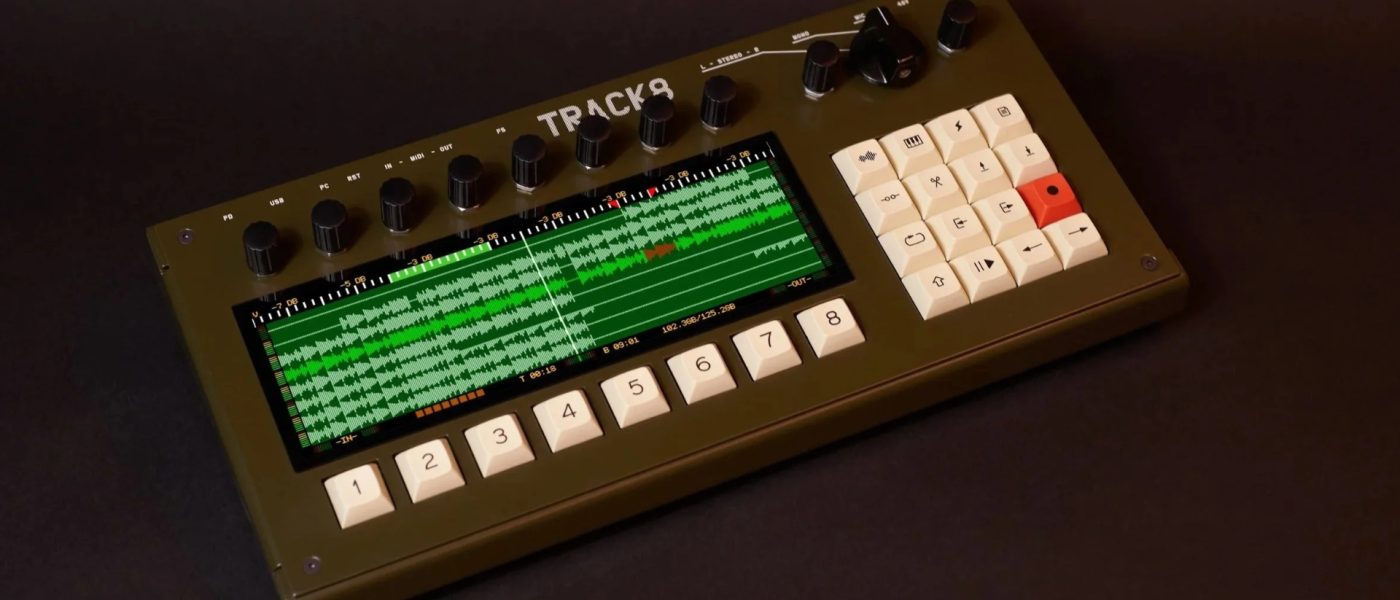
TL;DR: Thingstone’s Track8 standalone hardware arranger gets a major update (1.1.0), adding the ability to connect class-compliant USB audio interfaces for up to 48 inputs and 18 outputs. This turns the previously limited I/O into a scalable hybrid studio hub, while keeping its core focus on distraction-free DAWless arranging.
- Update 1.1.0 brings External Audio support via USB audio interfaces, scaling I/O to 48 inputs and 18 outputs.
- You can now record up to 8 stereo sources simultaneously, with dedicated stereo send/return per track and 8 additional stereo input devices.
- Track8 remains an 8-track audio + 8-track MIDI hardware arranger with 120GB internal storage and no built-in sound generation.
- Price remains €1799.99/$1999.99 — a niche tool for serious DAWless arrangers, not for the faint of wallet.
- Developer Collin Raddatz confirmed customers are using it in hybrid setups, not just pure DAWless workflows.
Reading time: 4 min
Want more synth news before your next coffee break? Join the Noxal newsletter — no spam, just gear worth knowing about.

What Is the Thingstone Track8?

We at Noxal have a soft spot for hardware that refuses to be a jack-of-all-trades. The Thingstone Track8 is exactly that: a standalone hardware arranger that does one thing — arrange — and does it without pretending to be a synth, a mixer, or your next Instagram backdrop. Conceived by German one-man company Thingstone and developer Collin Raddatz, Track8 is an 8-track audio and 8-track MIDI recorder/arranger with a 120GB internal SSD, no built-in sound generation, and a focus on capturing ideas without the DAW’s infinite pull of distraction.
I first laid hands on this at Superbooth, and my immediate reaction was: “This is either the most focused tool I’ve ever seen or the most expensive way to avoid opening Ableton.” After spending time with the update, I’m leaning toward the former. The hardware itself feels purposeful — mechanical buttons for audio editing, a straightforward browser for file management, and a workflow that prioritizes linear arrangement over endless tweaking. It records at 1-float/32-bit, offers up to four hours of project time, and gives you copy/cut/paste for up to eight minutes of audio. There’s even an eight-minute undo stack, because we all make mistakes — especially at 3 AM after three espressos.
Update 1.1.0: The External Audio Game-Changer
When Track8 first launched, its Achilles’ heel was I/O. You had one stereo input (mono 1/4″, stereo 1/4″, or XLR with 48V phantom power), and multi-track recording of multiple devices wasn’t possible. That was a dealbreaker for anyone wanting to record a live jam with several synths at once. As I wrote back then: “This forces you to record one instrument at a time, which is something limiting to me.” And judging by the comments on Gearspace, I wasn’t alone — many called it a “no buy” at this price point.
Update 1.1.0 addresses this head-on. By connecting class-compliant USB audio interfaces, the system now scales to 48 inputs and 18 outputs. You can record up to 8 stereo sources simultaneously, with a dedicated stereo send/return for each track. Plus, you can integrate 8 additional stereo input devices. This transforms the Track8 from a single-source recorder into a hybrid studio hub that can swallow your entire Eurorack case, three synthesizers, and a microphone — all at once.
I spoke with Collin Raddatz at SynthFest France 2026, and he confirmed that many customers were already using Track8 in hybrid setups — not just pure DAWless workflows. “People are combining it with digital mixers, audio interfaces, and even other hardware sequencers,” he told me. “The update just formalizes what they were already doing.” Smart move. The hardware arranger space is crowded with MPCs and Maschines that do everything, but Track8’s new I/O flexibility makes it a serious contender for those who want a dedicated arranging brain without the OS-level clutter.
What Remains the Same: Audio and MIDI Arranging
Under the hood, Track8’s core philosophy hasn’t changed. It’s still an 8-track audio arranger with eight MIDI tracks, each assignable to channels 1-16. The MIDI sequencer records note data, pitch bend, modulation, and CC automation — with step recording for single or multiple notes. You get velocity adjustment, quantization, and the same copy/cut/paste editing that works on audio. It’s utilitarian, but that’s the point: no menus, no submenus, no “creative” distractions. Just you, your gear, and the arrangement.
The audio engine offers track-level effects (multimode filter, compressor, delay, reverb send) and master FX (delay, reverb, compressor/limiter with clipping detection). You can mix down to a single WAV file or export raw stems to USB storage. The pre- and post-recording features — count-in, punch-in, bounce-in-place — give you DAW-like power without the DAW’s existential dread. And the 2048x zoom? Yes, you can see individual samples. Because sometimes you need to nudge a hi-hat by 0.3 milliseconds, and that’s okay.
One thing that hasn’t changed: the price. Track8 retails for €1799.99/$1999.99. That’s not cheap. But for a dedicated hardware arranger with this level of I/O scalability and no subscription fees, it’s competitive with high-end MPCs or a loaded Maschine+ setup. The question isn’t whether it’s worth the money — it’s whether you need a standalone arranger at all. If you’re happy bouncing between a DAW and a few hardware boxes, Track8 might feel redundant. But if you want a single box that orchestrates your entire studio without a laptop in sight, this is now a much more compelling argument.
Market Context and Who This Is For
The DAWless movement has matured. It’s no longer about rebellion against screens — it’s about workflow. People use MPCs and Maschines because they offer all-in-one production, but they also complain about the complexity. “I just want to arrange my tracks, not learn a new OS,” is a sentiment we hear often at Noxal. Track8 is for those people. It’s for the synth enthusiast who has a mixer, a few sequencers, and a pile of gear, but needs a central arranger that doesn’t try to be everything.
With the 1.1.0 update, it’s also for the hybrid studio owner who wants to record multiple synths simultaneously without a DAW. The ability to connect a class-compliant USB interface and get 48 inputs means you can record your entire live set into Track8, edit it, and export stems — all without touching a mouse. That’s a specific use case, but it’s one that no other hardware arranger serves this cleanly. The Akai Force can do it, but it’s a different beast. The Tascam Model 12 is a mixer, not an arranger. Track8 occupies a unique niche: a linear arranger that treats audio and MIDI with equal respect, and now scales to meet your studio’s actual I/O needs.
Is it perfect? No. The price is steep, and the initial I/O limitations turned off many potential buyers. The update fixes the latter, but the former will always be a barrier. Still, for those who can afford it and need it, Track8 1.1.0 is a refined tool from a developer who listens. And in a world of bloated firmware updates and feature creep, that’s worth raising a coffee mug to.
Frequently Asked Questions
Can I use the Thingstone Track8 without a computer?
Absolutely. That’s the entire point. Track8 is a standalone hardware arranger that records, edits, and exports audio and MIDI without requiring a DAW or computer. You connect your gear directly to it via its built-in inputs or USB audio interfaces, and everything happens on the device itself.
What USB audio interfaces are compatible with Track8’s update 1.1.0?
Any class-compliant USB audio interface should work. That covers most modern interfaces from brands like Focusrite, Behringer, Universal Audio, and others. The update supports up to 48 inputs and 18 outputs, so you can scale your setup significantly. Check Thingstone’s documentation for specific models if you want guaranteed compatibility.
Is the Track8 worth €1799.99 compared to an Akai MPC or NI Maschine+?
It depends on your workflow. If you want an all-in-one production center with built-in instruments, effects, and sampling, an MPC or Maschine+ is more versatile. But if you specifically need a dedicated linear arranger for audio and MIDI — without the OS complexity — Track8 offers a cleaner, more focused experience. The new I/O scalability makes it much more competitive for hybrid studios.
We at Noxal will be testing Track8 with a 16-input interface and a full rack of synths next week — ideally while sipping a pour-over that’s been cooling for exactly eight minutes. Because some things, like good coffee and good arrangements, are worth the wait.