
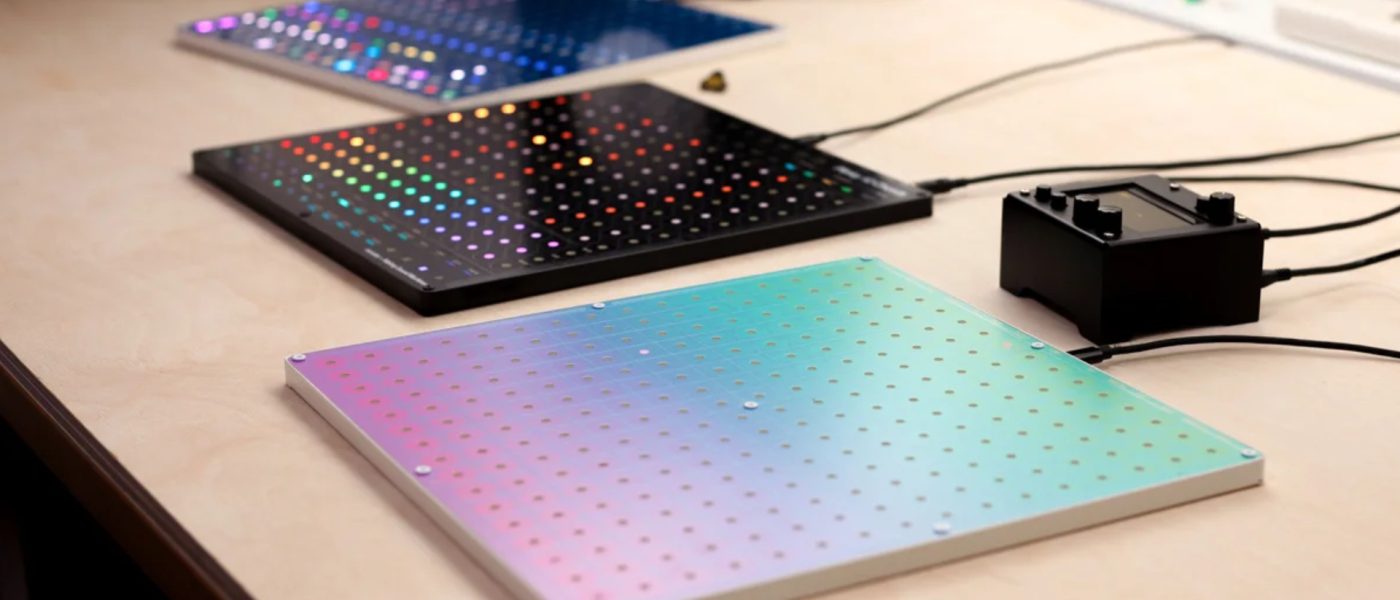
TL;DR: Making Sound Machines, in collaboration with mmalex and Toadstool Tech, has unveiled the Plinky 12 ahead of Superbooth 2026. It’s a single, ultra-thin hardware unit that transforms into three distinct touch-based instruments via swappable physical panels, each offering a unique musical concept built on a shared polyphonic synth engine. The platform is open for user-created panels, with availability slated for Summer 2026.
- The Plinky 12 is a single 12″x12″x12mm hardware device that can become three different instruments via interchangeable physical panels.
- All panels share a new polyphonic synth engine that transforms samples into wavetables and is controlled entirely via a 16×16 RGB pressure-sensitive touch grid.
- The three launch panels are: Toadstep (a 4-track step sequencer groovebox), Chords (a harmonic inspiration machine), and Blocks (an open, Monome-Grid compatible clip launcher).
- The system features an open API and a promised browser-based coding environment, allowing users to design and load their own custom instrument panels.
- Connectivity is robust, including audio I/O, MIDI, 2x CV in/out, clock, USB, and a microSD slot, making it a potential hub for hybrid setups.
Reading time: 5 min
Want more synth news before your next coffee break? Join the Noxal newsletter — no spam, just gear worth knowing about.

Not One, But Three (And Yet One)

Here at Noxal, we see a lot of gear that iterates. The Plinky 12 is not that. Making Sound Machines, alongside collaborators mmalex (creator of the original Plinky) and Toadstool Tech, has engineered a conceptual sidestep. They aren’t releasing three new instruments. They’re releasing one instrument that can convincingly pretend to be three. The Plinky 12 hardware is a universal, super-thin (12mm!) 12-inch square slate. Its brain is an RP2350 microcontroller, but its soul is swappable. You slot in a different physical panel, and the device reboots—not just the software, but the entire musical philosophy—into a new instrument.
This is a fascinating approach to hardware longevity and user investment. Instead of buying three separate boxes, you buy one core and collect personalities. The announced trio—Toadstep, Chords, and Blocks—is just the “beginning,” hinting at a future ecosystem of panels. It turns the instrument from a product into a platform. The physicality is key; this isn’t just loading a new firmware skin. You get a new tactile surface, new layouts printed right on the grid, which fundamentally changes how you relate to the machine. It’s modularity at the interface level, not the signal level.
The Common Core: Touch & Wavetable Synthesis
Beneath all panel-swapping lies a unified sonic heart. The Plinky 12 sports an all-new polyphonic synth engine that carries the distinctive, slightly unpredictable “Plinky character.” It’s a sample-based wavetable synth at its core, but with a twist: you can freeze samples into wavetables. From there, you have a full toolkit—start/end point scanning, ADSR, filters, wavefolding, reverb, delay, chorus, and panning. It’s a capable and complex sound design engine.
The radical part is how you control it. Following the original Plinky’s ethos, there are no knobs or sliders. Everything is managed through the 16×16 RGB pressure-sensitive capacitive touch grid. Parameters are changed by sliding a finger across the surface, with the ability to animate these movements for evolving modulation. It’s a profoundly different workflow that trades tactile detents for fluid, continuous gestural control. A dedicated editor will allow for preset management and even sound design without the hardware present, which is a thoughtful touch for the traveling sound-shaper.
A Tour of the Launch Panels
So, what do these three personalities actually do? First up is the Plinky 12 Toadstep, crafted by Toadstool Tech. This panel transforms the unit into a 4-track touch groovebox optimized for live jams. Think funky riffs, self-generating melodies, or acid lines, with per-step control over slides, probability, velocity, and gate length. It has advanced ratcheting, step repeating, and pattern chaining. It’s the immediate, performative face of the Plinky 12.
The Plinky 12 Chords panel is the “harmonic inspiration machine.” It splits up to 12 voices of polyphony between six chords and six melody voices. You get 13 palettes with 45 chords each and four polyphonic melody surfaces. It includes a polyphonic arpeggiator with 32×16 step patterns and a 128-step sequencer for chord shapes, complete with probability and the signature “Stolperbeats” shuffle. This is for the composer who wants to break out of a harmonic rut with a single touch.
Finally, Blocks is the “distraction and label-free” panel. It’s an open, minimalist layout ideal for Monome-Grid compatibility. The surface is divided into a large 6-string play area, a clip launcher, and an XY pad. Each clip is a full 128-step polyphonic sequence with performance muting, shuffling, and probability. This is the panel for the experimentalist who wants a clean canvas and a direct connection to the grid.
Open Ends and Studio Potential
The most compelling long-term feature might be the open API and the promised browser-based coding environment. Making Sound Machines is inviting users to design their own panels. This gives you direct access to the hardware—the synth engine, effects, MIDI, CV connectivity, and the touch grid itself. The potential is staggering: custom sequencers, novel controllers for external gear, or entirely new instruments limited only by one’s coding chops. This transforms the Plinky 12 from a clever product into a genuine hacker’s playground.
Connectivity further cements its role as a potential studio hub. With stereo audio I/O, MIDI in/out, 2 CV inputs and outputs, clock in/out, USB (for power, data, and MIDI), and a microSD slot, it can easily sit at the center of a hybrid setup. It can sequence your Eurorack, process external audio through its filters and effects, or simply act as a wildly expressive MIDI controller for your software synths. Its thin profile means it could sit neatly on top of a keyboard or mixer without claiming much real estate.
Who Is This For, Really?
The Plinky 12 is not for the knob-twiddling traditionalist. If your ideal synthesizer interaction involves grabbing a cutoff knob with gusto, this will feel alien. It’s for the performer who values gesture and immediacy, the composer seeking generative inspiration, and the tinkerer who sees an open API as an invitation, not a threat. It’s also for the space-conscious musician who wants multiple instruments but only one footprint.
I have my reservations, purely personal. While the touch interface is revolutionary, I wonder about the precision and muscle memory for live tweaking without physical feedback. But that’s the point—it’s a different paradigm. The Plinky 12 asks you to re-learn how to interact with sound. For those willing to make that leap, it offers a uniquely flexible and forward-thinking platform. The price is still TBA, but its value will be directly tied to the richness of the panel ecosystem that grows around it. We’ll be watching its development with great interest, likely over a very carefully placed cup of coffee.
Frequently Asked Questions
Is the Plinky 12 just a MIDI controller?
No. While it can absolutely function as a powerful and expressive MIDI controller (especially with Monome-Grid compatibility), it is a fully self-contained synthesizer with its own polyphonic wavetable engine, effects, and audio outputs. Each panel runs a complete instrument.
Do I have to buy all three panels separately?
Details on bundling aren’t announced yet, but the implication is that panels will be sold individually. You buy the Plinky 12 core hardware and then purchase the panels (Toadstep, Chords, Blocks) that interest you. The system is designed for you to collect them over time.
How does the touch interface work for parameter control?
Instead of knobs, you use the grid. Typically, you’ll touch a pad to select a parameter, then slide your finger horizontally or vertically across the grid to adjust its value. The RGB LEDs provide visual feedback. Movements can be recorded as automation lanes for animated, evolving changes in sound.
I’m off to practice my parameter slides. My coffee has gone cold, but my curiosity about user-generated panels is suitably caffeinated.