TL;DR: Synido’s TempoKEY K32 Play is a 32-key battery-powered MIDI controller with built-in PCM sounds, Bluetooth MIDI, and a built-in speaker — designed for mobile music-making without a computer. At $139.99, it joins a growing wave of affordable standalone keyboards from Chinese brands, offering eight assignable encoders, eight drum pads, and a five-hour battery life.
- 32 pressure-sensitive keys with built-in PCM sound engine (128 sounds across 16 categories, plus 10 drum kits) for standalone use.
- Five-hour battery life, Bluetooth MIDI, and an onboard speaker — no laptop or iPad required for basic play.
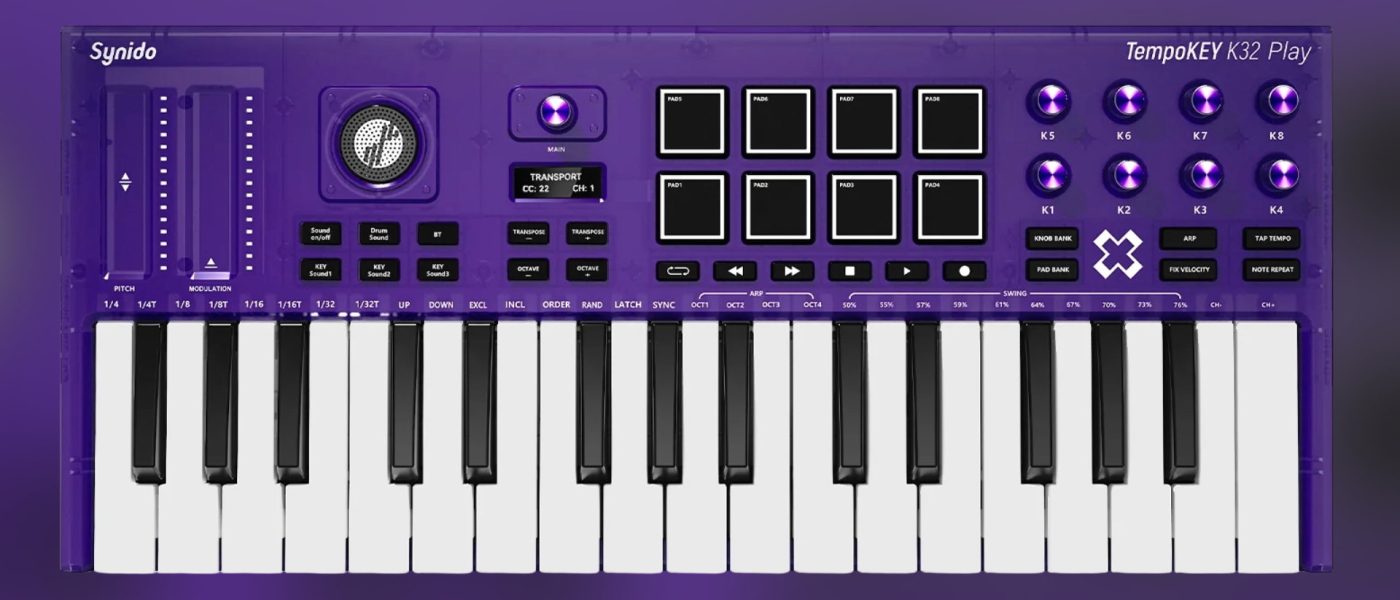
- Includes eight assignable encoders, eight drum pads, touch-strip pitch/mod wheels, transport controls, arpeggiator, and note repeat.
- Dedicated editor software for full MIDI customisation; sounds themselves are not editable.
- Available now for $139.99, competing with the Akai MPK mini Play MK3 (no battery) and M-VAVE SMK-37 Pro (FM synth engine).
Reading time: 4 min
Want more synth news before your next coffee break? Join the Noxal newsletter — no spam, just gear worth knowing about.

What Is the Synido TempoKEY K32 Play?

Synido’s TempoKEY K32 Play is a 32-key MIDI controller keyboard that doesn’t need a computer to make noise. At first glance, it looks like a standard portable MIDI controller — black chassis, compact form, an array of pads and knobs — but the built-in speaker gives it away. This thing wants to be played anywhere, from a park bench to a cluttered studio desk.
We at Noxal have seen a lot of portable keyboards cross our desks, but the K32 Play stands out because it’s genuinely standalone. Plug in nothing but headphones (or just use the speaker) and you’ve got sounds. That’s rare in the sub-$150 range, and it’s a feature we’ve been begging for from bigger brands for years. Arturia and Novation have nothing like it. Akai’s MPK mini Play MK3 comes close but lacks both battery and Bluetooth.
The K32 Play ships with a dedicated editor software that lets you remap every MIDI control — pads, knobs, transport, you name it. That’s a nice touch, though the sounds themselves are locked down. You get what you get. For the price, that’s acceptable.
Sound Engine: PCM, Not FM
Let’s talk about what’s under the hood. The TempoKEY K32 Play uses a PCM sound player, not an FM or subtractive synth engine. That means you’re getting sample-based sounds — 128 of them spread across 16 categories (piano, bass, strings, brass, ethnic, etc.) plus 10 drum kits. The drum kits include room, power, electronic, and TR-808, which is a nice nod to the classics.
Now, I’ll be honest: this isn’t going to replace your Hydrasynth or even a Volca. The sounds are what they are — usable, decent, but not tweakable. You can change drum assignments via the editor, but don’t expect to sculpt a pad sound or mess with filter cutoffs. This is a tool for sketching ideas, not sound design. For that purpose, it works.
Compared to the M-VAVE SMK-37 Pro, which packs an FM synth engine and proper pitch/mod wheels for a similar price, the K32 Play’s PCM engine feels a bit basic. But the SMK-37 Pro doesn’t have a speaker or five-hour battery. Trade-offs everywhere. If you want editable sounds, look elsewhere. If you want a grab-and-go sketchpad, this fits the bill.
Controls and Connectivity
The front panel is packed: eight assignable encoders, eight velocity-sensitive drum pads, touch-strip pitch and mod wheels, an OLED display, transport controls, note repeat, and a multimode arpeggiator. No chord mode, which is a bummer for a keyboard aimed at mobile jamming. The arpeggiator is standard but functional.
I have to say it: I prefer proper wheels. The touch strips work, but they lack the tactile feedback of a real pitch wheel. The M-VAVE SMK-37 Pro shows that physical wheels are possible at this price point. Synido’s choice here feels like a cost-saving measure that sacrifices playability. Still, if you’re used to X/Y pads or touch strips, you’ll adapt.
Connectivity is solid for a portable unit: USB-C, 3.5mm headphone out, TRS 3.5mm MIDI in/out, and Bluetooth MIDI. The Bluetooth is a welcome addition — it pairs easily with iPads and lets you cut the cable entirely. The five-hour battery life is enough for a long session or a short trip. Not groundbreaking, but reasonable.
Market Context: Who Is This For?
At $139.99, the TempoKEY K32 Play sits in a crowded but interesting space. The Akai MPK mini Play MK3 lacks battery and Bluetooth. The M-VAVE SMK-37 Pro has an FM engine and physical wheels but no speaker or Bluetooth. The Donner Starrykey 37 is another FM option. Synido’s play is about portability and instant sound — no setup, no cables, no fuss.
Who should buy this? Bedroom producers who want to sketch ideas on the couch. Travelers who need a compact keyboard for hotel rooms. Teachers who want a simple, battery-powered keyboard for workshops. Anyone who’s tired of being tethered to a laptop. It’s not a performance instrument for serious synth heads, but it’s not trying to be.
The bigger picture: Chinese companies like Synido, Donner, and M-VAVE are filling a gap that Western brands have ignored. They’re making affordable, feature-packed portable keyboards with built-in sounds and batteries. That’s good for everyone. Competition drives innovation. I just wish they’d invest in better pitch/mod controls and editable sound engines. Next time, maybe.
Frequently Asked Questions
Can the Synido TempoKEY K32 Play be used as a standard MIDI controller for DAWs?
Yes, absolutely. It works over USB-C or Bluetooth MIDI with any computer or mobile device. The editor software lets you customise all MIDI assignments, including pads, knobs, and transport controls.
How long does the battery last, and can I use it while charging?
Synido claims up to five hours of battery life. Yes, you can use it while plugged into USB-C power. It’s not a fast-charging unit, but it works fine for extended sessions.
Does the TempoKEY K32 Play have velocity-sensitive keys and aftertouch?
The keys are pressure-sensitive but not aftertouch-equipped. Velocity response is basic — no release velocity or detailed scan rate specs are provided, which is a common omission in this price range.
We at Noxal will be testing the K32 Play with a pour-over and a deadline looming. If the speaker doesn’t drown out the kettle, it might just earn a permanent spot on our coffee table. Now, where’s the TRS cable?