
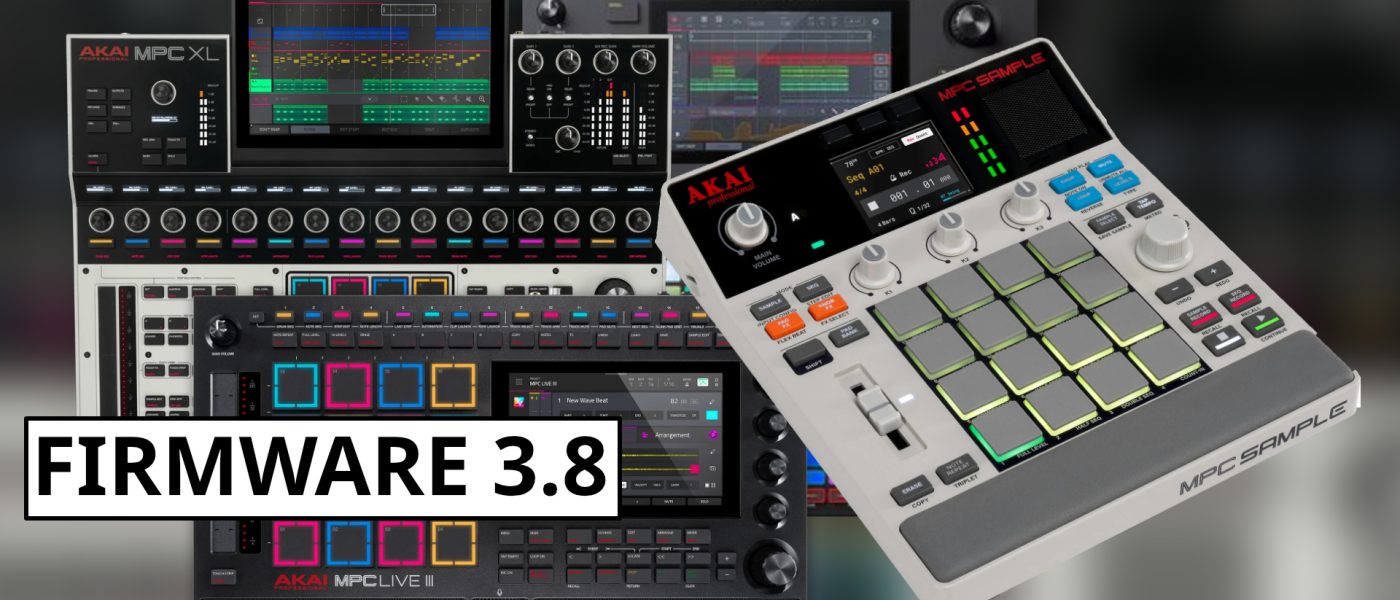
TL;DR: Akai has dropped MPC 3.8 firmware, a free update that brings deep integration between the sold-out MPC Sample and the flagship MPC/Force standalone line. You can now load MPC Sample projects directly on the big MPCs, export tracks back, and grab five new effects from the portable unit. It’s the kind of cross-pollination that makes you wonder why they didn’t do it sooner.
- MPC 3.8 is a free update for all MPC standalone units (X, Live, One, Key, Force) and the desktop app.
- You can load MPC Sample projects directly on the flagship MPCs and export tracks back to the Sample.
- Five new effects from the MPC Sample are added: color compressor, tape & vinyl emulator, vintage plugin, and trigger FX.
- The update includes bug fixes and stability improvements—because even Akai knows glitches kill the vibe.
- MPC Sample remains hard to find, but this update makes the most of it if you were lucky enough to snag one.
Reading time: 4 min
Want more synth news before your next coffee break? Join the Noxal newsletter — no spam, just gear worth knowing about.

The Big News: MPC Sample Meets the Flagship
Akai has been on a roll with the MPC Sample. It sold out on day one, and if you’ve tried to buy one since, you know the pain—it’s still harder to find than a quiet coffee shop at noon. But the real story here is that Akai isn’t letting the Sample live in isolation. With firmware 3.8, the MPC standalone lineup (X, Live, One, Key, Force, and desktop) now speaks the Sample’s language natively.
This isn’t a minor patch. It’s a full integration that lets you load MPC Sample projects directly on the big MPCs. Think of it as a bridge between the portable, battery-powered sketchpad and the studio workstation. You can create beats on the go with the Sample, then import them into your flagship MPC for finishing touches, arrangement, and mixing. It’s the kind of workflow continuity that makes you wonder why it took this long.
I’ll be honest—I’m surprised Akai moved this quickly. Usually, these cross-platform integrations come years later, if at all. But here we are, and I’m not complaining.
What Makes It Interesting
The MPC Sample has always been a bit of an odd duck. It bears the legendary three letters, but its engine is different from the flagship standalones. It’s more of a streamlined, battery-powered sampler than a full-blown workstation. That made it great for quick ideas, but less so for serious production. Now, with 3.8, the gap closes.
The import/export functionality is a game-changer for anyone who owns both devices. You can start a beat on the Sample during your commute, then open it on your MPC One or MPC X at home and pick up exactly where you left off. No conversion, no file wrangling—just seamless project handoff. And if you want to go the other way, you can export tracks from the big MPCs back to the Sample for live jamming or further portability.
But what really caught my eye is the effects transfer. The MPC standalone units now get five new effects from the Sample: color compressor, tape & vinyl emulator, vintage plugin, and trigger FX. These aren’t just filler—they add character. The tape & vinyl emulator, in particular, is a nice touch for those of us who like a little grit in our beats.
Key Specs and What’s New
Let’s get into the details. Firmware 3.8 is a free update for the entire MPC standalone lineup, including the Force and the desktop version. It’s available now, so no waiting. Here’s what you’re getting:
First, the MPC Sample project import/export is the headline feature. You can load .xpj files from the Sample directly on the MPC. That includes all your samples, sequences, and patterns. Exporting works the same way—send your MPC tracks back to the Sample for portable use. Second, the five new effects are integrated into the MPC’s effects chain. They’re not just presets; you can tweak parameters and save your own setups. Third, the usual bug fixes and stability improvements are included. Nothing glamorous, but essential for keeping the workflow smooth.
It’s worth noting that the MPC Sample itself hasn’t changed—this is all about the flagship side. But the net effect is that the Sample becomes a much more compelling companion piece. If you’ve been on the fence about hunting one down, this might tip the scales.
Market Context and Who It’s For
Akai has been on a firmware roll lately. MPC 2.10 brought new plugin instruments and USB audio interface support. MPC 2.12.2 added four new AIR effects. And now 3.8 bridges the gap with the Sample. This is a company that’s clearly listening to its users—or at least, paying attention to what sells.
The MPC Sample’s instant sell-out was a clear signal: people want portable, dedicated hardware sampling. But the Sample alone is limited. With 3.8, Akai turns it into a proper sketchpad for the flagship line. This is for the producer who works in multiple spaces—on the couch, in the studio, on the road—and doesn’t want to compromise on workflow continuity.
That said, I do have a gripe. Where’s the integration for Akai’s own MIDI controllers, like the MPK Mini or APC series? Being able to map knobs and pads from an APC64 to the MPC’s clip launcher would be a huge upgrade. But for now, we’ll take what we can get. And what we’re getting is solid.
Frequently Asked Questions
Is the MPC 3.8 firmware update free?
Yes, it’s a free update for all current MPC standalone units (X, Live, One, Key, Force) and the desktop version. Just download it from Akai’s site or use the MPC Software updater.
Do I need to own an MPC Sample to use the new features?
No, but the headline feature—loading MPC Sample projects—requires that you have projects created on the Sample. The five new effects are available to all MPC users regardless of whether you own a Sample.
Will this update work with the MPC Touch or older MPC models?
No, the update is specifically for the current standalone MPC lineup and the Force. Older models like the MPC Touch or MPC Renaissance are not supported.
I’m going to celebrate by loading a beat I made on the Sample into my MPC One, then immediately making a terrible cup of instant coffee to remind myself that not everything can be this smooth. Cheers, Akai.