
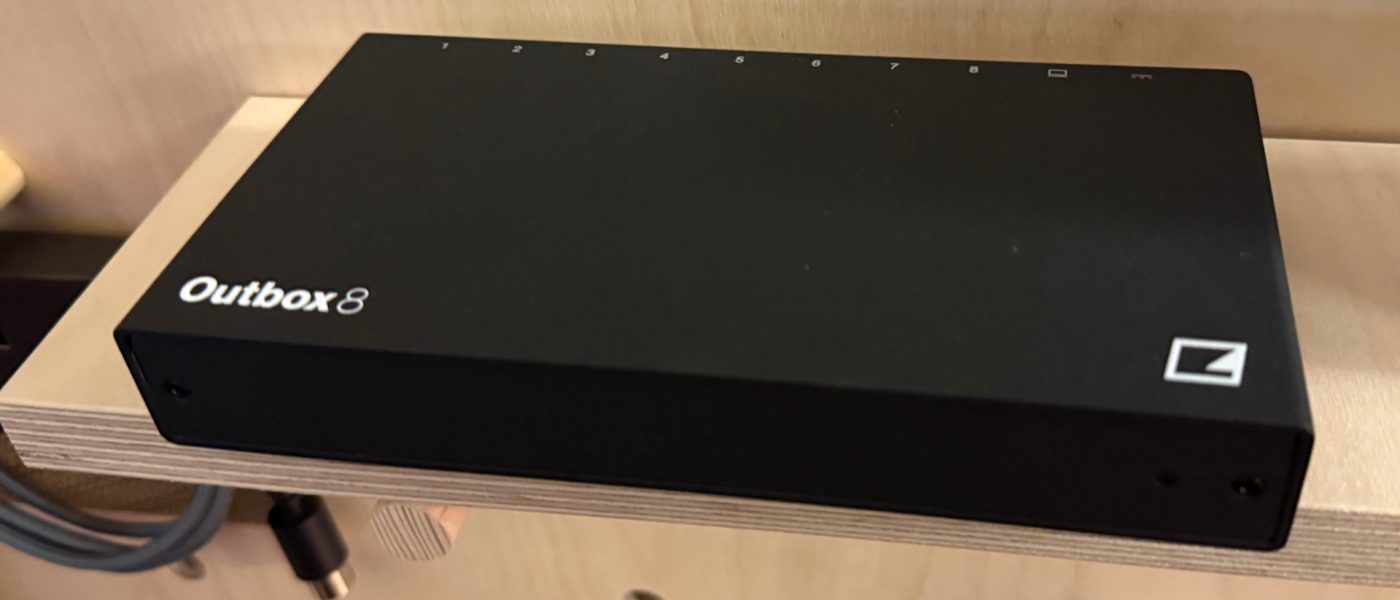
TL;DR: Elektron has unveiled the Outbox 8, a dedicated multi-output hardware interface that gives any Overbridge-compatible Elektron device up to eight DC-coupled audio or CV/gate outputs—no computer required. It breaks the stereo shackles on popular boxes like Digitakt and Digitone, offering individual track routing for external processing and modular integration. Priced between €250–300, it ships this summer.
- Adds up to 8 balanced audio or CV/gate outputs (mono or stereo pairings) to any compatible Elektron device via USB.
- Compatible with Digitakt 1/2, Digitone 1/2, Analog Four & Rytm Mk2, and Syntakt—including older Mk1 units found cheap on the used market.
- No computer needed for multi-track audio routing: replaces Overbridge software with direct hardware control.
- Each output can be assigned to a specific track (e.g., kick on channel 1, snare on channel 2) or used as CV/gate for modular synths.
- Available summer 2026 (June/July) for €250–300, making it an affordable upgrade for existing Elektron setups.
Reading time: 4 min
Want more synth news before your next coffee break? Join the Noxal newsletter — no spam, just gear worth knowing about.

What Is the Elektron Outbox 8?

At Superbooth 2026, Elektron quietly dropped what might be the most practical piece of gear they’ve made in years: the Outbox 8. It’s a compact multi-output interface that connects to any Overbridge-compatible Elektron instrument via USB, then gives you eight DC-coupled, balanced audio outputs or CV/gate jacks. Think of it as Overbridge in a box—minus the laptop, the cable spaghetti, and the inevitable OS update that breaks everything.
The interface itself is refreshingly no-nonsense. Plug it in via USB, and a new “Elektron Outbox 8” menu appears on your device. From there, you assign each of the eight outputs to a specific track. Want the kick on output 1, snare on 2, hi-hats on 3? Done. Need to send a sequence as CV to your modular? Just reassign an output to CV/gate mode. It’s the kind of flexibility that Elektron users have been begging for since the first Digitakt arrived with its single stereo pair.
Why This Matters: The Stereo Shackles Come Off
Let’s be honest: the biggest complaint about the Digitakt, Digitone, and even the Syntakt has always been the output limitation. You get one stereo output, and that’s it. Sure, you can use Overbridge on a computer to route individual tracks, but that means booting a DAW, dealing with buffer settings, and losing the hardware immediacy that drew you to Elektron in the first place. The Outbox 8 kills that workflow bottleneck cold.
You can run the eight outputs as mono tracks, or pair them for up to four stereo outputs. If your track is stereo, it sums to mono on a single output—no surprises there. But the real magic is hybrid setups: send a few tracks to external effects pedals, use a couple of outputs as CV/gate to sequence a modular rack, and still have outputs left for the main mix. At Superbooth, Elektron demonstrated exactly this: a Digitakt driving a Eurorack case via CV while simultaneously feeding individual drum sounds through a chorus pedal. No computer. No fuss. Just pure, caffeinated creativity.
Key Specs and Compatibility
The Outbox 8 is class-compliant, meaning it should work with any device that sends audio over USB—though Elektron only officially supports their own gear. Compatible devices include Digitakt 1 and 2, Digitone 1 and 2, Analog Four & Rytm Mk2, and Syntakt. Notably, the Mk1 Digitakt and Digitone are supported, which is a big deal: those units are plentiful on the used market for under €400, and adding an Outbox 8 turns them into proper multi-track production hubs for under €700 total.
Pricing is set between €250 and €300, with availability expected around June or July 2026. That’s a bargain when you consider that a decent 8-channel audio interface with DC coupling costs as much, and doesn’t integrate with Elektron’s menu system. The Outbox 8 also bypasses the need for a computer entirely—just plug, assign, and play. For studio producers and live performers alike, that’s the killer feature.
Market Context and Who It’s For
We at Noxal have seen plenty of “game changers” come and go—most of them are just marketing fluff wrapped in aluminum. But the Outbox 8 is different. It solves a specific, long-standing pain point for a dedicated user base without requiring a new flagship purchase. This isn’t a new synth; it’s a bridge that makes existing gear exponentially more useful. That’s rare, and it’s worth celebrating.
Who should buy this? Anyone who owns a Digitakt or Digitone and has ever felt frustrated by the stereo output limitation. Live performers who want to send individual tracks to a mixer or external effects without a laptop. Modular enthusiasts who want to sequence their Eurorack from an Elektron box. And yes, the person who keeps saying “I’ll just use Overbridge” but never actually does. For €250–300, this is a no-brainer upgrade that adds more value than a new set of patch cables or a boutique reverb pedal. Just be prepared to explain to your bank account why you need eight outputs for a drum machine.
Frequently Asked Questions
Does the Outbox 8 work with non-Elektron devices?
It’s a class-compliant audio interface, so in theory, any device that sends audio over USB (like some Roland gear) could work. However, Elektron only officially supports their own Overbridge-compatible instruments, and the dedicated menu for output assignment is specific to Elektron hardware. Third-party use is at your own risk—and your own coffee consumption.
Can I use the Outbox 8 with a computer?
Technically yes, but that misses the point. The Outbox 8 is designed to replace the computer-based Overbridge workflow. If you want to use it as a standard audio interface with a DAW, it will work, but the real advantage is the standalone, no-laptop routing it offers for Elektron devices.
Do I need to update my Elektron device’s firmware?
Yes, you’ll need the latest firmware that includes the Outbox 8 menu. Elektron typically rolls out compatibility updates alongside new hardware releases. Check their support page before ordering, unless you enjoy staring at a blank screen while your synth silently judges you.
The Outbox 8 is the kind of gear that makes you rethink your entire setup—and then spend the next hour rearranging your patch cables while your coffee gets cold. Worth it.