
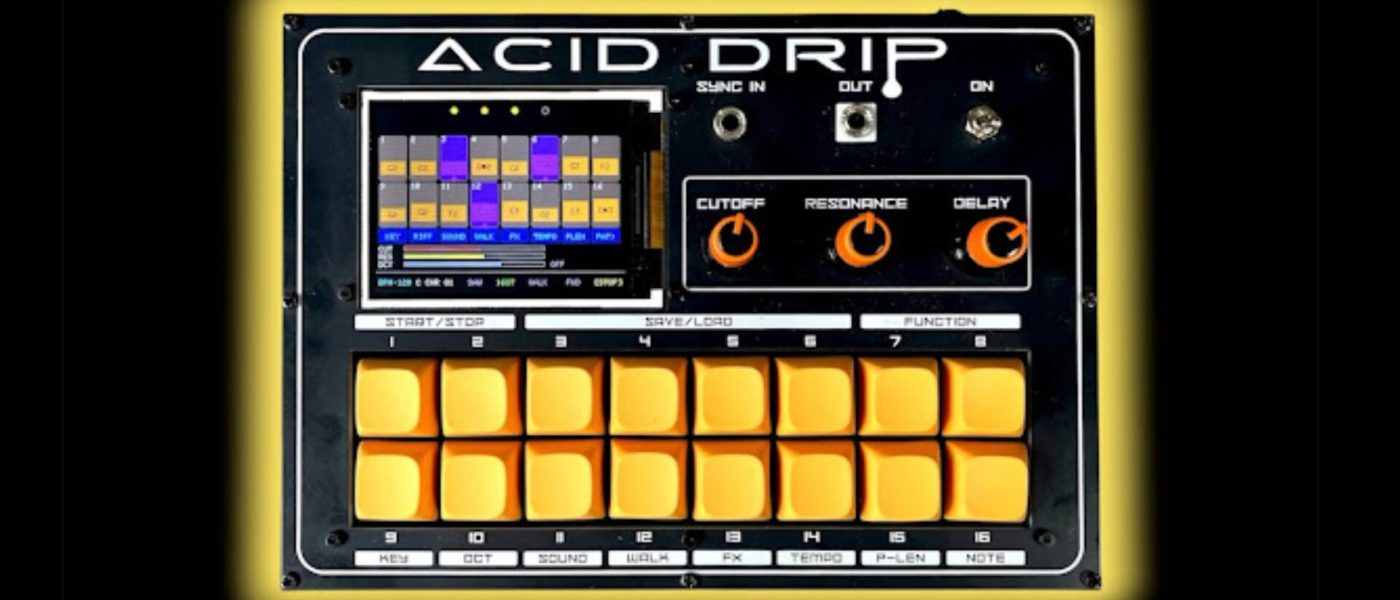
TL;DR: Marcus Dunn (Lonesoulsurfer) has released the Acid Drip, an open-source DIY groovebox built on a Raspberry Pi RP2040. It pairs a Badass Bass-derived acid synth engine with a lo-fi DrumKid drum machine, all controlled by a 16-step sequencer. The project is fully open-source on GitHub, making it an affordable, hackable entry point for hardware tinkerers.
- Dual-core RP2040 runs both an acid bassline synth (Badass Bass) and a lo-fi drum machine (DrumKid) simultaneously using the Mozzi audio library.
- Includes a 16-step acid sequencer and a 16-pattern groove generator, with physical controls for cutoff, resonance, and delay on the synth side.
- Hardware features a 320×240 ILI9341 TFT display, 16 Cherry MX pads, 3.5mm main output, and sync input; V2 adds an extra mixer pot.
- Entire project is open-source on GitHub, with images showing V1 and a revised V2 design – expect to source and solder your own components.
- Priced at component cost only (likely under $50-70), making it one of the cheapest groovebox projects available for DIY enthusiasts.
Reading time: 4 min
Want more synth news before your next coffee break? Join the Noxal newsletter — no spam, just gear worth knowing about.

Introducing the Acid Drip

We at Noxal have a soft spot for anyone who looks at a Raspberry Pi and thinks, “I can make that make music.” Marcus Dunn, operating under the moniker Lonesoulsurfer, has done exactly that with the Acid Drip – an open-source groovebox that pairs a squelchy acid bassline synth with a lo-fi drum machine. It’s not a polished commercial product, and that’s precisely the point.
The Acid Drip is built around the RP2040 microcontroller, the same chip that powers the Raspberry Pi Pico and countless DIY synth projects. It’s cheap, it’s well-documented, and it’s just powerful enough to run two audio engines simultaneously on its dual cores. Dunn has leveraged two existing open-source projects – Badass Bass for the synth and DrumKid for the drums – and wired them together into a single, pocket-sized instrument.
First impressions from the photos: it’s compact, rugged, and looks like it belongs on a workbench next to a soldering iron and a half-empty cup of coffee. The V1 images show a clean layout with 16 Cherry MX pads and a small TFT screen. V2 already exists, adding an extra pot for the mixer – a clear sign that this is a living project, not a finished product.
Two Engines, One Brain
Let’s talk about what’s under the hood. The acid bassline synth is based on Badass Bass, a ten-year-old open-source engine that, despite its age, still delivers that characteristic Roland TB-303-style squelch. It’s not trying to be a faithful clone – it’s a reinterpretation, built on the Mozzi audio library, which handles real-time audio synthesis on low-power microcontrollers. You get cutoff, resonance, and delay as hands-on parameters, which is exactly what you need for acid lines that wobble and squeal.
The drum machine side uses Matt Bradshaw’s DrumKid, which has a deliberately lo-fi character. Think 8-bit crunch, limited sample rate, and a charm that no amount of high-resolution samples can replicate. The two engines run on separate cores of the RP2040, so there’s no resource contention – the bass doesn’t stutter when you trigger a kick, and the hats don’t glitch when you tweak the filter. It’s a clever use of the dual-core architecture, and we appreciate that Dunn didn’t try to cram everything onto one core.
Both engines are sequenced by a 16-step acid sequencer for the bass and a 16-pattern groove generator for the drums. The pattern generator is likely a simple but effective way to build drum sequences without needing a separate step sequencer for each voice. It’s not Elektron-level complexity, but it doesn’t need to be – this is a groovebox for jamming, not for micro-editing every hi-hat.
Hardware and Sequencing
The hardware is refreshingly straightforward. A 320×240 ILI9341 TFT display gives you visual feedback – likely a grid for the sequencer and parameter values. The 16 Cherry MX pads are a nice touch; they’re durable, responsive, and have that satisfying click that makes you want to keep pressing them. You also get a 3.5mm main output and a sync input on the front panel, which means you can slave the Acid Drip to other gear or clock it from a modular setup.
The sequencer is described as a “16-step acid sequencer” and a “16-pattern drum groove generator.” It’s not entirely clear from the source text whether the drum patterns are pre-programmed or user-editable, but given the open-source nature, we suspect you can tweak them in code. That’s the trade-off: you get total control, but you’ll need to dive into the code to change the patterns. For some, that’s a feature; for others, it’s a dealbreaker.
Connectivity is minimal – no MIDI, no USB host, just a sync input and an audio output. This is a standalone groovebox meant to be played by itself or synced to other gear via analog clock. If you need MIDI, you’ll have to add it yourself. But honestly, for a project this size, that’s fine. The focus is on immediate, hands-on jamming, not on being the center of a complex studio setup.
Market Context and Who It’s For
We at Noxal have seen a wave of Raspberry Pi-based instruments over the past few years – from the Axoloti to the Organelle to the endless stream of Pi-based Eurorack modules. The Acid Drip sits at the budget end of that spectrum. It’s not a commercial product; it’s a DIY project that you build yourself. The cost is whatever you pay for the components, which could be as low as $30-50 if you already have a soldering iron and some spare parts.
Who is this for? It’s for the tinkerer who enjoys the process as much as the result. It’s for the person who wants to understand every layer of their instrument, from the bootloader to the audio buffer. It’s for the bedroom producer on a tight budget who’s not afraid to get their hands dirty with some through-hole soldering. It is not for someone who wants a plug-and-play groovebox with a polished UI and MIDI implementation. That’s not a criticism – it’s a statement of intent.
Compared to something like the Teenage Engineering EP-133 K.O. II ($299) or the Roland AIRA Compact T-8 ($199), the Acid Drip is cheaper but demands more of you. You trade convenience for cost and customizability. And in a world where most gear is locked down and proprietary, that’s a refreshing change of pace.
Frequently Asked Questions
What skills do I need to build the Acid Drip?
You’ll need basic soldering skills, an iron, and the ability to read a schematic. The project is open-source on GitHub, so you’ll also need to be comfortable downloading code and flashing it to the RP2040. If you’ve built a simple kit before (like a fuzz pedal or a Eurorack module), you can handle this.
Does the Acid Drip have MIDI or USB connectivity?
Not in its current form. The hardware includes a sync input for analog clock, but no MIDI in/out or USB host. You can add MIDI yourself by modifying the code and hardware, but it’s not included out of the box. The focus is on standalone jamming.
Can I use my own samples or synth sounds?
The synth engine is based on Badass Bass (a subtractive acid synth), and the drum machine uses DrumKid’s lo-fi engine. You cannot load external samples or presets – the sounds are generated in real time. However, since it’s open-source, you can modify the code to change waveforms, parameters, or even swap out the entire engine if you’re comfortable with C++ and the Mozzi library.
I’m going to build one of these, drink three espressos, and then spend an hour trying to sequence a 303 line that doesn’t sound like a dying cat. That’s the dream, right?