
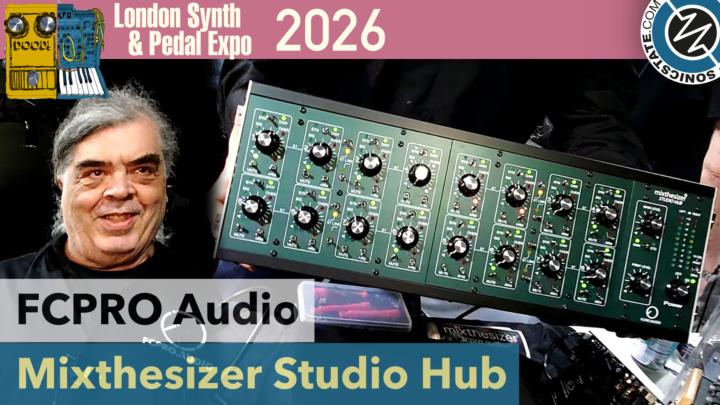
TL;DR: At LSPXPO 2026, FCPro.Audio unveiled the Mixthesizer Studio Hub, a dedicated 16-channel line-level mixer for synthesizers that’s expandable to 64 channels. It functions as both a monitor controller and a DAW-integrated summing mixer, with pricing starting around $2,700.
- 16 dedicated line-level synth inputs, expandable in blocks of 8 to a total of 64 channels.
- Dual-function knobs control both input gain and monitor level, with a switch to flip between live synth output and DAW return.
- Integrates directly with your DAW via a special stereo bus for recording armed synth tracks.
- Professional DB25 connections with per-channel dip switches to select balanced or unbalanced operation.
- Positioned as a dedicated studio hub for synth collectors, starting at approximately $2,700.
Reading time: 4 min
Want more synth news before your next coffee break? Join the Noxal newsletter — no spam, just gear worth knowing about.
What Is the Mixthesizer Studio Hub?

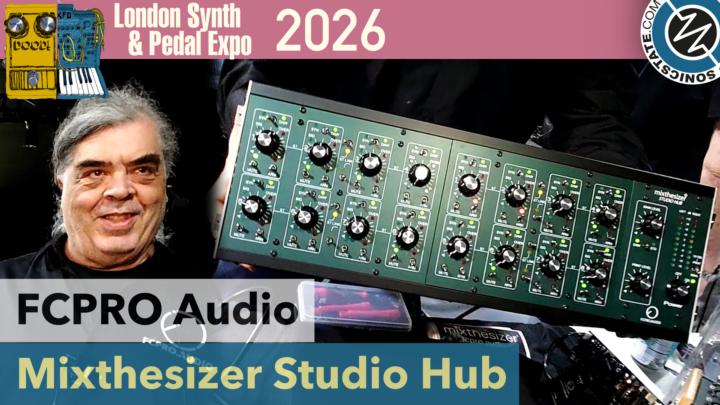
Let’s cut through the trade show haze. The FCPro.Audio Mixthesizer Studio Hub is not another mixer. It’s a declaration of intent. In a world where we routinely plug $4,000 analog polysynths into the line inputs of a $500 audio interface designed for podcasters and guitarists, FCPro.Audio is asking a simple, expensive question: what if your mixer was built from the ground up for the specific, sometimes irrational, needs of a hardware synth studio? The answer is this 3U rack unit: a 16-channel line-level mixer, monitor controller, and DAW-integrated recording hub all in one.
The core concept is elegant. Each of its 16 channels is designed to be the permanent home for a synthesizer. The centerpiece is a dual-function knob. Turn it for input gain when you’re setting levels to record into your DAW. Press a button, and that same knob becomes your monitor level control for listening. Another button lets you instantly switch between hearing the raw, live output of your synth and hearing the recorded return from your DAW. This isn’t just mixing; it’s a streamlined workflow for composing, sound-designing, and tracking with a room full of hardware without constantly repatching or diving into software mixers.
The Synth-Centric Philosophy
What makes the Mixthesizer interesting isn’t a checklist of features you could find on a high-end console, but how those features are applied. The “special bus for recording armed synthesizers” is a perfect example. This isn’t just a stereo out. It’s a dedicated path that, when integrated with your DAW, allows you to record whichever synth you have “armed” in your session directly to a stereo track, presumably without touching the main mix. It acknowledges that in a synth studio, you’re often tracking one or two instruments at a time, not all 16 simultaneously, and it builds that reality into the hardware.
Furthermore, the ability to switch any input channel to a “DAW return” separately transforms the unit. In one mode, it’s a classic analog summing mixer, blending the outputs of your synths. Flip those switches, and those channels become dedicated monitor paths for the stereo outputs from your DAW—your soft synths, effects returns, or the full mix. This dual identity as both a creative instrument (the summing mixer) and a critical listening tool (the monitor controller) is where the “Studio Hub” name earns its keep. It wants to be the central nervous system of your setup.
Specs, Expansion, and Professional I/O
On the technical side, the Mixthesizer speaks the language of a serious studio. Connections are handled via DB25 multipin connectors, in blocks of 8 channels. This is pro-audio standard, keeping cable nests manageable and interfacing cleanly with high-end audio interfaces and patchbays. Crucially, each input has a dip switch to select between balanced and unbalanced operation. This is a small detail with huge implications for synth collectors, as it means you can properly interface with both modern balanced-output gear and vintage, unbalanced synths without worrying about impedance mismatches or buying a pile of external converters.
The expansion from 16 to 64 channels is a clear signal of who FCPro.Audio is targeting: the accumulator, the collector, the artist with a wall of modular and a problem that only more inputs can solve. Starting at 16 channels is sensible—it covers a formidable starter arsenal. The promise of expansion means the hub can theoretically grow with your addiction, er, collection. While the base price of ~$2,700 positions it firmly in the “investment” category, that price must be weighed against the cost and clutter of achieving a similar, integrated setup with a gaggle of separate mixers, monitor controllers, and line amps.
Who Is This For (And Is It Worth It)?
Let’s be blunt: the Mixthesizer Studio Hub is not for the person with one polysynth and a drum machine. It’s for the individual whose studio photo induces gear envy and logistical panic in equal measure. It’s for the producer who spends more time repatching cables than tweaking filters, and who views their DAW as a tape machine and editor rather than the creative center. This hub is a solution for permanent, recallable setups where every instrument is always plugged in, always ready to play, and always one button press away from being tracked.
Is it worth $2,700? That depends entirely on the scale of your problem. If you’re constantly fighting ground loops, wrestling with interface insufficiencies, or wasting creative time on setup, then this dedicated tool starts to look less like a luxury and more like necessary infrastructure. It exists in a niche between high-end monitor controllers like the Dangerous Music Monitor ST and sophisticated line mixers, but with a focused synth workflow that neither of those fully provides. It’s a specialist tool for a specialist crowd. For them, it might just be the missing piece that turns a collection of instruments into a cohesive, playable studio.
Frequently Asked Questions
Does the Mixthesizer have built-in audio interfaces or USB connectivity?
No, based on the information provided, it does not. The Mixthesizer Studio Hub is an analog line-level mixer and monitor controller that connects to your existing audio interface and DAW via its DB25 outputs. You will need separate interface(s) with DB25 (or compatible) inputs to get the audio into your computer.
Can I use it with effects pedals or other outboard gear?
While its primary design is for synths, the line-level inputs with gain control could certainly accommodate other line-level gear like drum machines, effects returns, or even a tape deck. The lack of microphone preamps or instrument inputs means guitars and mics would need to be brought up to line level elsewhere first.
How does the “recording armed synthesizers” bus actually work with my DAW?
The specifics aren’t fully detailed, but the implication is a tight integration likely via a control protocol like MIDI or Ethernet. The idea is that when you “arm” a track in your DAW for recording, the Mixthesizer automatically routes the corresponding synth’s signal to its dedicated stereo recording bus, which you would then patch into two inputs on your interface. This allows for one-button, spill-free recording of whichever synth is selected in your session.
Now, if you’ll excuse me, I need to stare at my current patch bay and sigh deeply, before calculating how many synths I’d need to own to justify this. The answer is always ‘one more,’ but my coffee’s gone cold.